
How Axon’s Creative Studio Generates Video Ads From a URL
Automated Creative Production for Video Ads: What It Takes to Go From URL to Finished Ad
Creative volume is one of the biggest factors in scaling campaigns. On Axon, we recommend uploading up to 10 files per asset type per creative set so the platform can test different hooks, formats, and messages to find what performs best.
But the challenge is that most teams cannot produce that amount of creatives manually. Building video ads takes time and costs hundreds or even thousands of dollars.
For teams already managing multiple campaigns, that often turns creative production into the biggest bottleneck to scaling.
Automated creative production changes that. Instead of spending days writing scripts, sourcing footage, editing variations, and resizing assets, advertisers can now go from a product URL to a finished video ad in minutes.
That matters on Axon because the strongest-performing brands are not relying on one or two “hero” ads. They are constantly refreshing creatives to give the platform more opportunities to find what resonates and scale performance.
Let’s understand exactly what happens between entering a URL and launching a finished, Axon-ready video ad.
Generating videos with just your URL on Axon
To begin with, many brands make the mistake of taking their best-performing ad from Meta or TikTok and simply uploading it unchanged. But what works on another platform does not always work on Axon.
Axon ads are full-screen, immersive, and unskippable for at least five seconds. That means you have more attention to work with and more space to tell a story. Instead of creating a short, thumb-stopping clip, you can create a longer, more educational narrative that moves someone from curiosity to purchase.
With our URL-based video generation feature, the goal is not just to automate creative production at scale, but to ensure that every finished video accurately reflects the brand’s voice, positioning, and identity.
Here’s how it works.
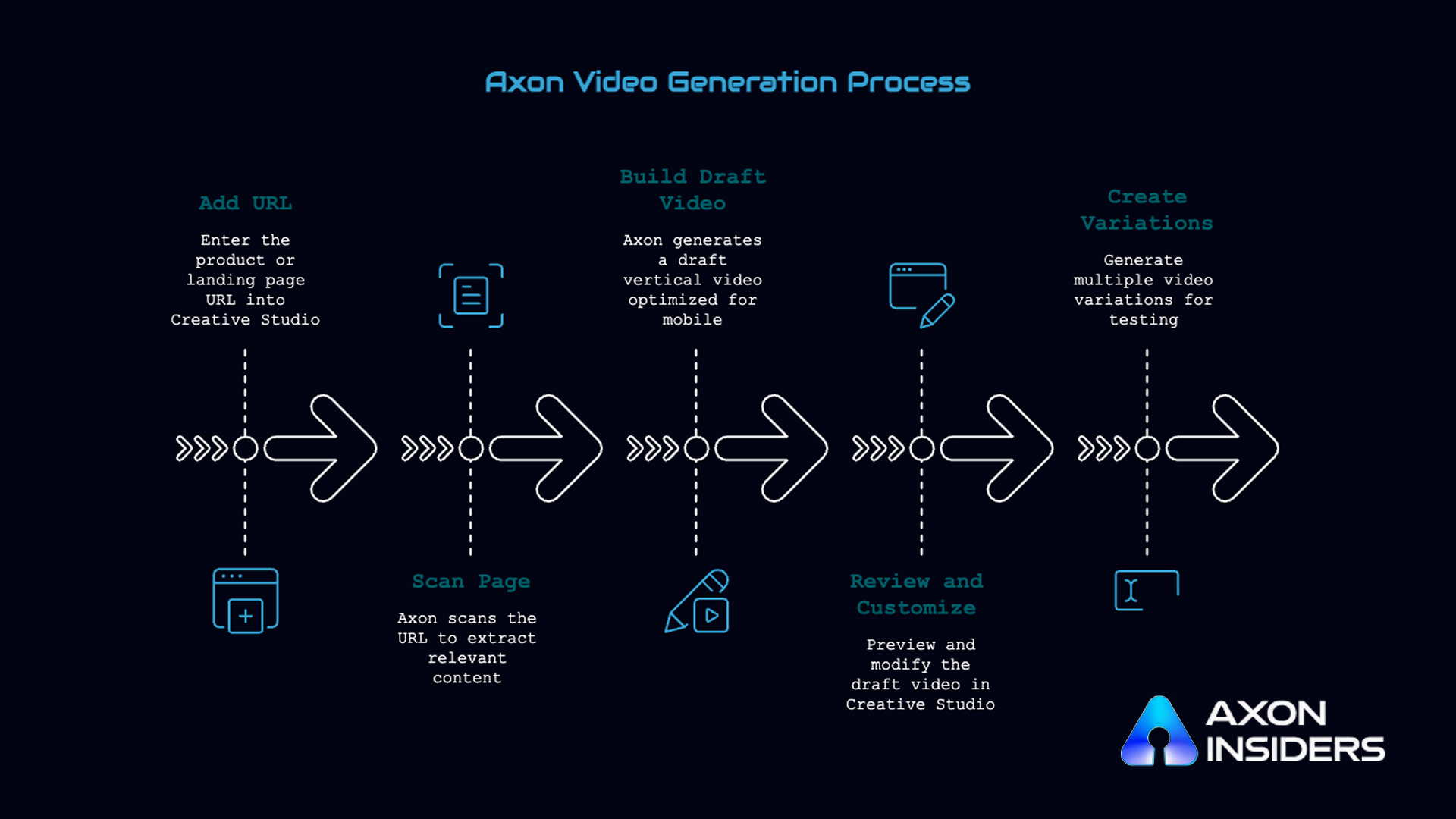
1. Add your product or landing page URL
The process starts with a product page or landing page URL. Once you enter the URL in Creative Studio, Axon scans the page and pulls in the most relevant content, including:
- Product images
- Logos and brand visuals
- Product descriptions and headlines
- Promotional messaging and CTAs
From this information alone, the platform already has the building blocks it needs to generate an ad.
This streamlines creative production, especially for e-commerce brands with diverse product lines.
This approach also aligns with Axon’s broader creative strategy, which is built around high-volume creative production and continuous testing. For e-commerce brands in particular, Axon can combine video, interactive landing pages, and dynamic catalog ads into one seamless, connected ad experience.
2. Axon builds a draft video automatically
Using the collected site elements, Axon’s Creative Studio generates a draft vertical (9:16) video formatted and optimized for mobile. The draft is structured for Axon’s full-screen, immersive ad unit, typically including:
- A clear hook, product explanation, and a strong CTA
- Cohesive visual style matching your site’s branding and message
- Elements that help maintain a polished and seamless look
The goal is not simply to stitch together a few product images. The generated video is designed to feel cohesive, polished, and aligned with the brand. That means we ensure:
- The story flows naturally from hook to CTA
- Product images, pricing, and promotions are accurate
- Branding, colors, and messaging stay consistent with the website
- Captions, music, and transitions feel polished rather than auto-generated
- The video reflects the way the brand already speaks to customers
3. Review and customize the video
The generated video is not final. You can preview it inside Creative Studio and make changes before launching. That includes:
- Changing text, messaging, images, or video clips
- Updating CTA language, branding, and end cards
- Adjusting sequence and layout to fit campaign goals or audience
This is useful if you want to tailor the creative for a specific audience or campaign.
4. Create multiple variations for testing
The biggest advantage of generating video from a URL is speed. Instead of starting from scratch every time, advertisers can quickly create a draft video and then use Creative Studio to test different variations.
Those variations can come from changing:
- Different hooks and headlines
- Different CTA wording and placement
- Promotional versus educational messaging
- Different interactive templates and end cards
- Different video lengths or product image order
Axon’s URL-based video generation is designed to provide a fast starting point, especially if you lack ready-made video assets. More advanced variations, such as customer testimonials, founder stories, product demos, or longer educational content, still benefit from additional advertiser input and custom asset uploads.
That matters because testing volume is one of the biggest drivers of performance on Axon. Campaigns with a broader mix of creative often outperform campaigns that narrow down too quickly to a single apparent winner.
The Future of Video Ads Is Faster, Smarter, and More Scalable
The traditional process of producing video ads is too slow for the way performance marketing works today.
Axon advertisers need fresh creative constantly. They need enough variation to test different messages, offers, and audiences. And they need to move fast when they find something that works.
That is exactly where automated creative production delivers the biggest advantage.
Instead of spending weeks building a handful of ads, you can generate a draft video from a single URL in minutes, then create and test different versions inside Axon, and quickly identify which combinations of hook, video, and end card are driving the best ROAS.
More importantly, it helps you work the way Axon is designed to work. The platform rewards creative breadth, consistent testing, and full-funnel storytelling. Automated creative production gives you the scale to do all three.
The brands that win on Axon will not be the ones creating the most ads manually. They will be the ones that can generate, test, and optimize more high-quality creative faster than everyone else.
Ready to see how leading gaming and e-commerce brands are scaling creative production and ad performance on Axon?
Request to join Axon Insiders and get access to exclusive playbooks, case studies, and behind-the-scenes insights from top advertisers.
Frequently Asked Questions (FAQs)
1. What does "generating video with your URL" mean on Axon?
This feature allows you to create a draft video ad by entering your product or landing page URL. Axon pulls key images and text from your website to build a mobile-ready, vertical video: a quick starting point if you don't have a finished video asset.
2. How do I use this feature?
Go to the Creative Studio in the Media section, choose to create an interactive page or ad, and enter your website URL. The system will generate a draft using your site's visuals and messaging, which you can then preview and further customize before adding to your campaign.
3. What is the benefit of generating a video from a URL?
The main benefit is speed: you get a fast draft ad without designing one from scratch. This helps you quickly test ads and launch campaigns, especially if existing assets aren't ready. For the best results, uploading custom, mobile-optimized video assets is still recommended.
4. Can I create multiple video versions from one URL?
You can start with the auto-generated draft and use Creative Studio to customize multiple versions by editing text, choosing different templates, or adding various hooks and calls-to-action. Doing so increases creative variety and improves campaign optimization.
5. Are there creative limits or best practices?
Axon encourages uploading at least 10 video assets per campaign, with different styles, lengths, and messaging. This enables broader testing and AI optimization. The system automatically favors high-performing assets and allocates spend accordingly. Avoid manually pausing creatives and let Axon's optimizer do the work.
Learn how Axon turns a product URL into a video ad in minutes, and how to customize and test variations to scale performance.